Dialog
| iOS | Android |
 |
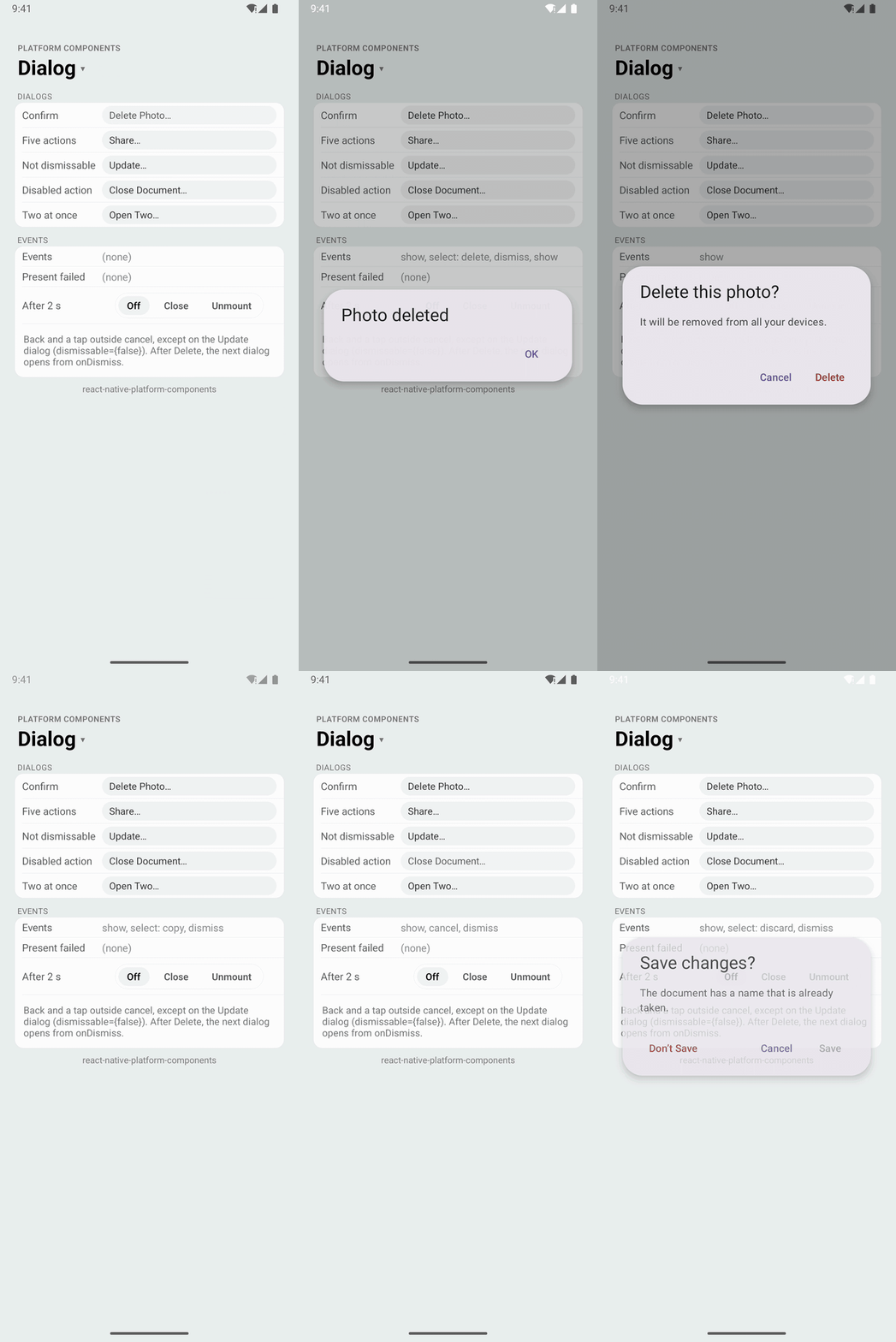 |
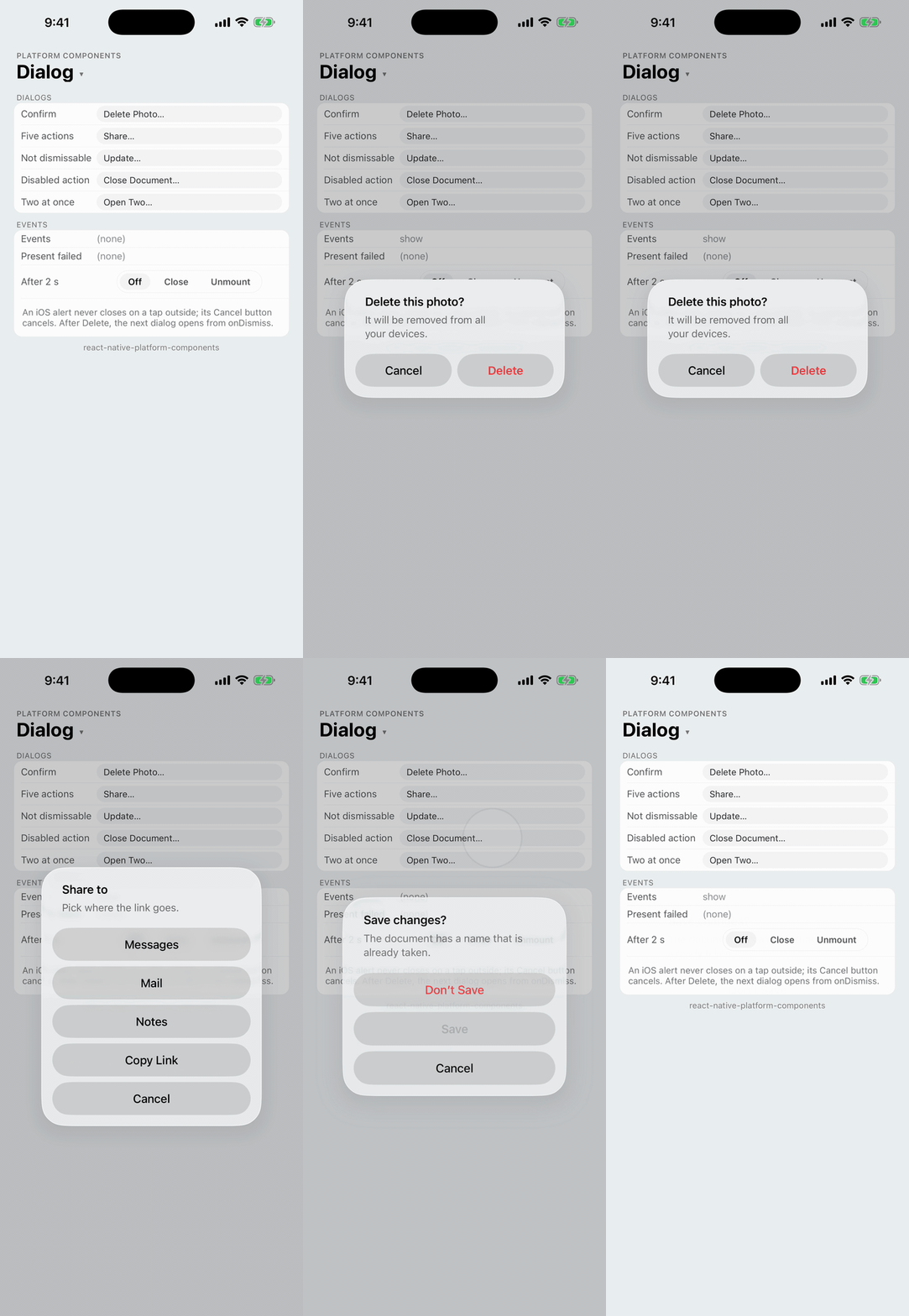
An alert dialog: a title, a message and a few buttons, presented over the screen while visible. Use it to confirm an action or to tell the user something they must acknowledge.
- iOS:
UIAlertControllerwith the.alertstyle, presented from the topmost view controller. - Android: a Material 3 alert dialog (
MaterialAlertDialogBuilder) in the app's Material theme. - Web: a modal
<dialog role="alertdialog">with a button per action.
Unlike React Native's Alert, every button has a testID, Android gets the Material 3 dialog with a destructive style and any number of buttons, and the component tells you when the dialog showed, when it has gone, and when it couldn't be shown.
| iOS 26 | Android |
|---|---|
 |  |
import { Dialog } from 'react-native-platform-components';

const [open, setOpen] = useState(false);

<Dialog
  visible={open}
  title="Delete this photo?"
  message="It will be removed from all your devices."
  actions={[
    { id: 'cancel', title: 'Cancel', role: 'cancel', testID: 'delete-cancel' },
    {
      id: 'delete',
      title: 'Delete',
      role: 'destructive',
      preferred: true,
      haptics: 'warning',
      testID: 'delete-confirm',
    },
  ]}
  onSelect={(id) => {
    setOpen(false);
    deletePhoto();
  }}
  onCancel={() => setOpen(false)}
/>;
The dialog is controlled: visible presents it, and the app sets it back to false in onSelect, onCancel and onPresentFailed. Setting visible to false while the dialog is up dismisses it without onSelect or onCancel (onDismiss still follows), and unmounting the component dismisses it silently. The component itself renders an empty view that takes no space, so it can go anywhere on the screen; keep it mounted while the dialog is up (not in a list row that can scroll away and be recycled).
Props
| Prop | Type | Description |
|---|---|---|
visible | boolean | Whether the dialog is presented (required) |
title | string | Title |
message | string | Message under the title |
actions | DialogAction[] | The buttons. See DialogAction and Button layout |
dismissable | boolean | Android and web: whether a tap outside and the back button (Escape on the web) cancel the dialog. Default true. See Cancel |
haptics | 'selection' | 'light' | 'medium' | 'heavy' | 'success' | 'warning' | 'error' | 'none' | Haptic played when the user picks a default or destructive action; an action's own haptics wins. See Haptics. Default: none |
maxFontSizeMultiplier | number | Android: largest scale the dialog's text may reach with the system font scale, as on Text. Unset or 0: no cap. iOS sizes the alert with Dynamic Type itself |
onSelect | (id: string) => void | Called with the action's id when the user picks a default or destructive action |
onCancel | () => void | Called when the dialog is cancelled. See Cancel |
onShow | () => void | Called once the dialog is on screen |
onDismiss | () => void | Called once the dialog has fully gone, whatever closed it. See Events |
onPresentFailed | (reason: DialogPresentFailure) => void | Called when the dialog couldn't be shown. See Presentation failures |
testID | string | Test identifier of the component's (empty) view |
DialogAction
| Property | Type | Description |
|---|---|---|
id | string | Unique, non-empty identifier passed to onSelect |
title | string | Button title |
role | 'default' | 'cancel' | 'destructive' | 'cancel' closes the dialog and calls onCancel (one per dialog); 'destructive' draws the button in red. Default 'default' |
preferred | boolean | The dialog's preferred action: bold on iOS (preferredAction), the end (positive) button on Android. One per dialog |
disabled | boolean | Dims the button; it can't be picked |
hidden | boolean | Leaves the action out |
haptics | 'selection' | ... | 'none' | Haptic played when this action is picked, in place of the component's haptics. The cancel action plays only its own |
testID | string | Test identifier of the button: the UIAlertAction's accessibilityIdentifier on iOS, the button's view tag on Android. See Testing |
A dialog takes one cancel action: UIKit throws an exception on a second .cancel action, so the component warns in development and shows any extra as a default action. A second preferred action is ignored the same way. Disabled, hidden and cancel actions never reach onSelect.
Button layout
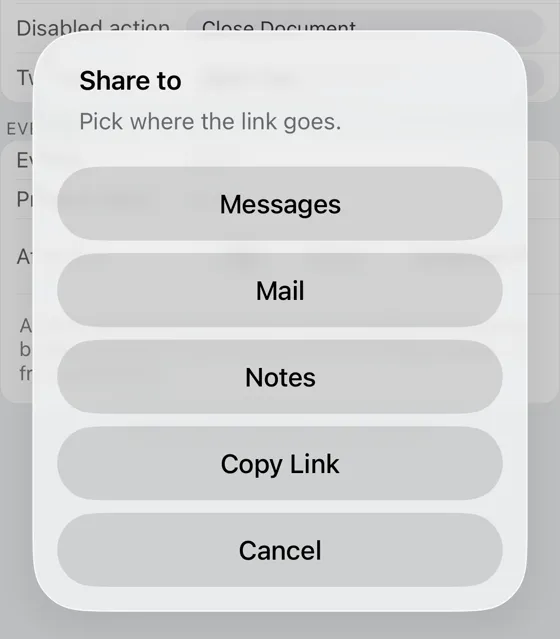
- iOS: UIKit lays out the buttons. Two sit side by side, with the cancel action on the leading side; three or more are stacked, with the cancel action at the bottom. The preferred action is bold.
- Android, up to three actions: they go in the Material dialog's own button row,
[neutral] … [negative] [positive]. The preferred action (or, without one, the last action that isn't the cancel action) is the positive button at the end, the cancel action the negative button next to it, and the remaining actions fill the negative and neutral slots in order. Material stacks the row on its own when the titles don't fit side by side. - Android, more than three actions: the builder only has three slots, so the buttons are stacked one per row, end aligned, as Material stacks dialog buttons, in the actions' order with the cancel action last. They use the theme's dialog text-button style and scroll if they don't fit.
| iOS 26, five actions | Android, five actions |
|---|---|
 |  |
Destructive buttons use .destructive (the system red) on iOS and the theme's colorError on Android (Material 3's error red when the theme has none). Disabled buttons use isEnabled = false on both platforms.
Cancel
onCancel is called for:
- the action with
role: 'cancel', on every platform; - Android: a tap outside the dialog and the back button, unless
dismissableisfalse(setCancelable(false)); - Web: Escape and a click outside, unless
dismissableisfalse.
An iOS alert never closes on a tap outside, so on iOS only the cancel action cancels, and dismissable changes nothing. A dialog without a cancel action (such as a required update) can then only be closed by one of its buttons, or by the app through visible.
Events
Every dialog that shows reports, in this order:
onShow, once it is on screen;onSelect(id)oronCancel(), when the user closes it (nothing when the app closes it throughvisible);onDismiss, once it has fully gone, whatever closed it.
onDismiss is the place to show the next dialog: by then the previous one has left the screen, so the next one presents cleanly. On iOS a dialog asked for while another presentation is still animating (one that just closed, say, if you chain from onSelect) waits for it to end. onDismiss isn't called when the component unmounts.
const [dialog, setDialog] = useState<'confirm' | 'done' | null>(null);
const next = useRef<'done' | null>(null);

<Dialog
  visible={dialog === 'confirm'}
  title="Delete this photo?"
  actions={[
    { id: 'cancel', title: 'Cancel', role: 'cancel' },
    { id: 'delete', title: 'Delete', role: 'destructive' },
  ]}
  onSelect={() => {
    setDialog(null);
    next.current = 'done';
  }}
  onCancel={() => setDialog(null)}
  onDismiss={() => {
    setDialog(next.current);
    next.current = null;
  }}
/>;
Presentation failures
A dialog shows one at a time: it never goes over another dialog. When visible turns true and the dialog can't be shown, onPresentFailed is called with a reason, nothing else follows, and nothing retries it; set visible back to false.
| Reason | When |
|---|---|
'busy' | Something it doesn't go over is up. iOS: any UIAlertController (another Dialog, an ActionSheet, React Native's Alert), or the screen the component is on is being dismissed. Android and web: another Dialog (the library can't see other apps' dialogs there) |
'noWindow' | The component isn't in a window, or there is no view controller (iOS) or live activity (Android) to show it from |
'rejected' | The system refused it: UIKit didn't present the alert, or Android threw BadTokenException |
The 'busy' rule on iOS is the library's: UIKit itself presents an alert over another alert, stacking the two. Over any other presented screen (a React Native Modal, say), the dialog presents on top of it.
Android theme
The dialog is built from the app's Material theme (with its materialAlertDialogTheme), so it takes your colors, shapes and type, and the useNativeTheme brand color. With an AppCompat theme it falls back to Material 3 defaults and logs one warning, like the other Material components (see Android Theme Configuration).
Testing
Each action's testID is what Detox's by.id matches: the accessibilityIdentifier of the UIAlertAction on iOS and the tag of the button's view on Android.
await element(by.id('delete-photo')).tap();
// iOS: the alert carries the identifier on more than one of its views
const confirm =
  device.getPlatform() === 'ios'
    ? element(by.id('delete-confirm')).atIndex(0)
    : element(by.id('delete-confirm'));
await waitFor(confirm).toBeVisible().withTimeout(6000);
await confirm.tap();
While the Android dialog is up, Espresso only sees the dialog's window; check the page after the dialog has closed. Give the actions test IDs that differ from the component's own testID. In Jest, the mock renders the buttons as Pressables with their testIDs while visible, and calls onShow and onDismiss as visible changes.