Chip
| iOS | Android |
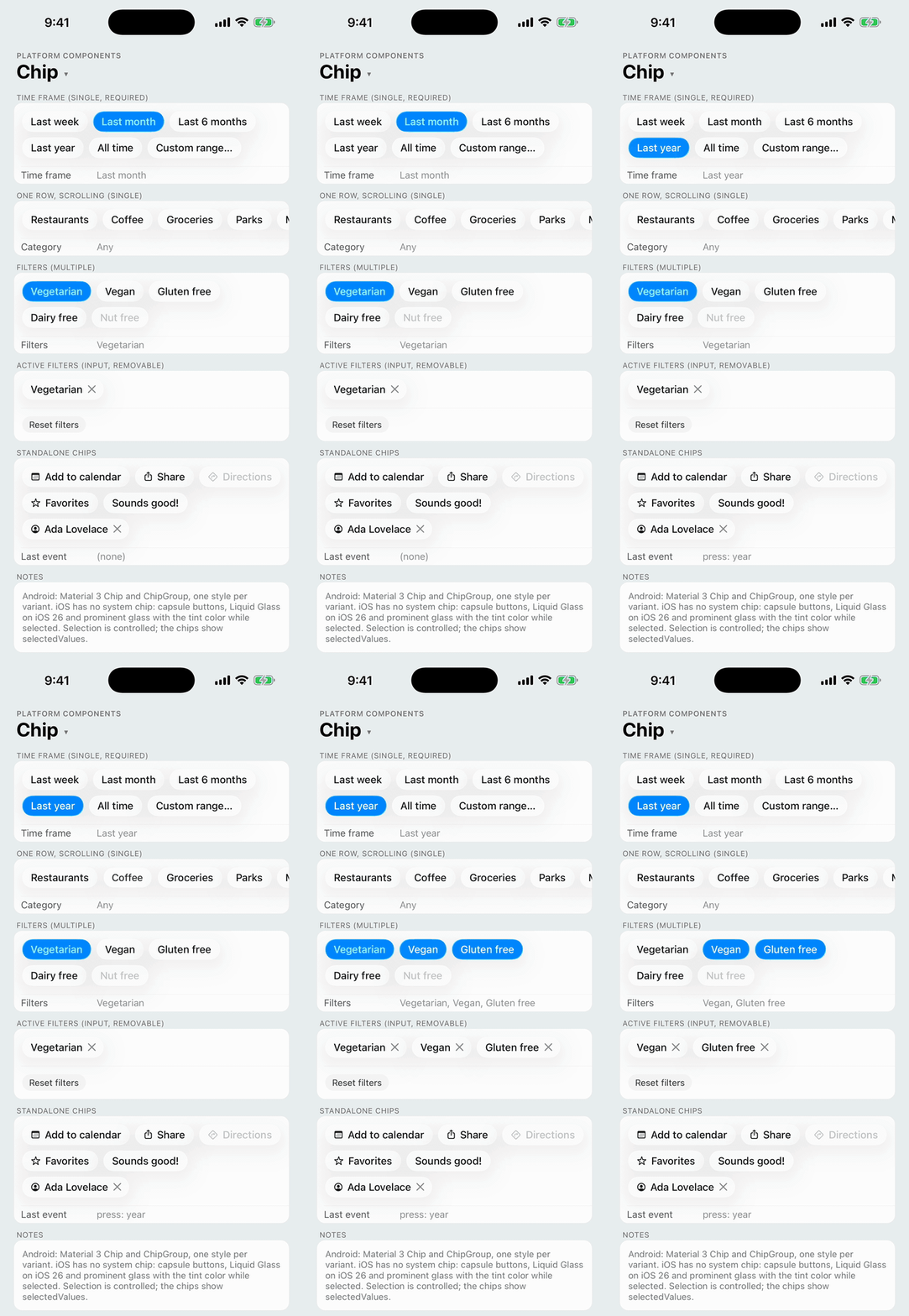 |
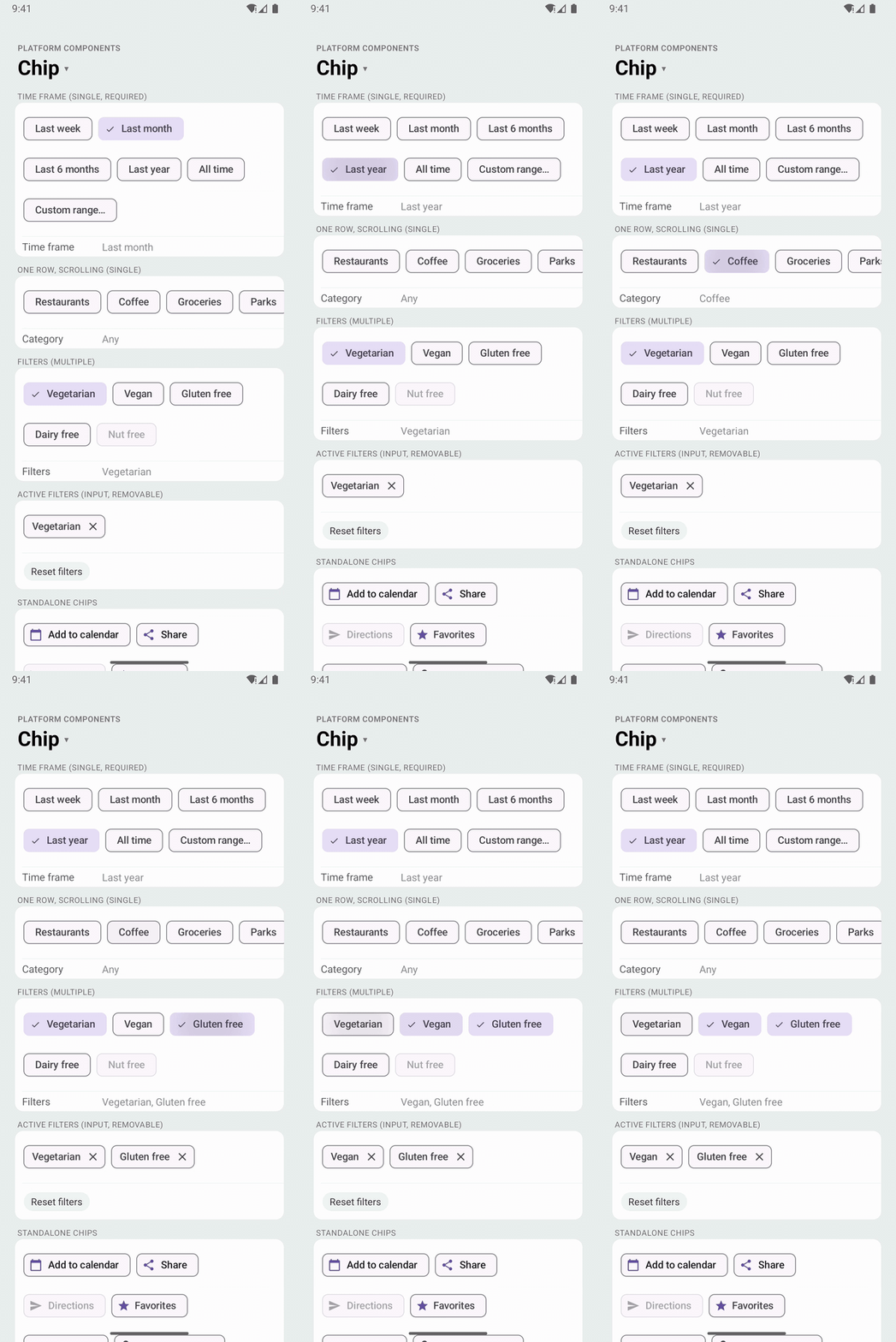 |
Compact elements for a set of options, filters, entered items or suggestions. ChipGroup lays out a set of chips, wrapping them onto rows or scrolling one row, with single or multiple selection; Chip is one chip on its own.
- Android: Material 3
Chipin the style of its type (Widget.Material3.Chip.Assist,.Filter,.Input,.Suggestion), in a MaterialChipGroup(isSingleSelection,isSelectionRequired,isSingleLine), in the app's Material theme. - iOS: there is no system chip. Each chip is a capsule
UIButton(UIButton.Configuration): Liquid Glass (.glass()) on iOS 26, and prominent glass with the tint color while selected; gray, and filled while selected, before iOS 26. The close icon is an xmark button at the trailing end. A group is a flow layout of those buttons, or one row in a horizontalUIScrollView. - Web: a wrapping row of toggle
<button>s, each with a close button beside it.
| iOS 26 | Android |
|---|---|
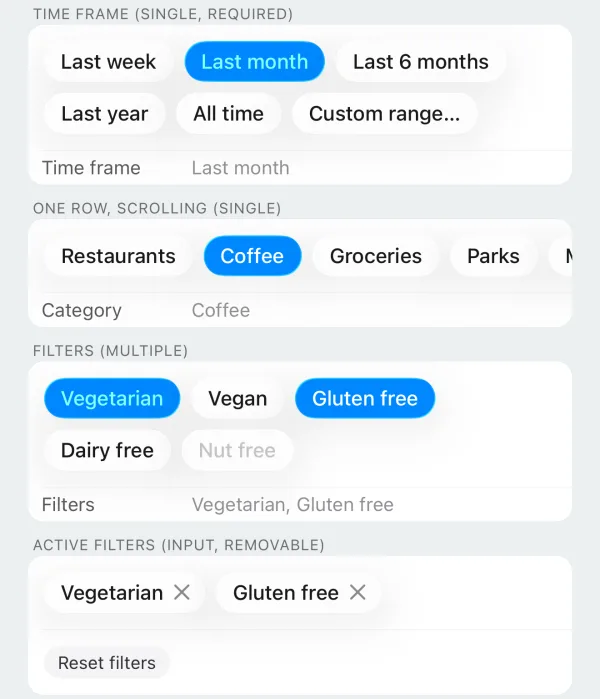 | 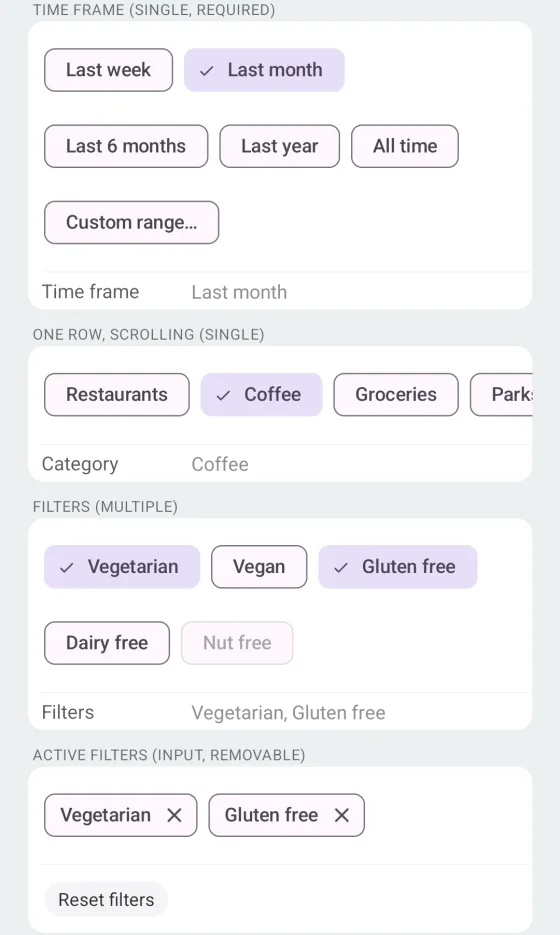 |
import { Chip, ChipGroup } from 'react-native-platform-components';

// A single-select filter, such as a report's time frame
const [timeFrame, setTimeFrame] = useState(['month']);

<ChipGroup
  chips={[
    { value: 'week', label: 'Last week' },
    { value: 'month', label: 'Last month' },
    { value: '6months', label: 'Last 6 months' },
    { value: 'year', label: 'Last year' },
    { value: 'all', label: 'All time' },
    { value: 'custom', label: 'Custom range…' },
  ]}
  selection="single"
  selectionRequired
  selectedValues={timeFrame}
  onSelectionChange={setTimeFrame}
/>

// The active filters, each with a ✕ to remove it
<ChipGroup
  variant="input"
  chips={filters.map((f) => ({ value: f.id, label: f.name }))}
  onClose={(value) => removeFilter(value)}
/>

// One chip
<Chip
  label="Add to calendar"
  icon={{ ios: 'calendar', android: 'calendar' }}
  onPress={addToCalendar}
/>
ChipGroup props
| Prop | Type | Description |
|---|---|---|
chips | ChipGroupItem[] | Chips to display. See ChipGroupItem |
variant | 'assist' | 'filter' | 'input' | 'suggestion' | Material 3 chip type of every chip. See Variants. Default: 'filter' when selecting, 'assist' otherwise |
selection | 'none' | 'single' | 'multiple' | Selection behavior. See Selection. Default: 'none' |
selectedValues | string[] | Values of the selected chips (controlled). Only the first is used with single |
selectionRequired | boolean | Whether one chip must stay selected. Default: true for single, false for multiple (as in ButtonGroup) |
wrap | boolean | true: chips wrap onto more rows. false: one row that scrolls horizontally. See Wrap or scroll. Default: true |
spacing | number | Gap between chips in points, across and between rows. Default: the platform's (8). See Spacing |
disabled | boolean | Disables every chip |
haptics | 'selection' | 'light' | 'medium' | 'heavy' | 'success' | 'warning' | 'error' | 'none' | Haptic played when a chip or a close icon is pressed. See Haptics. Default: none |
maxFontSizeMultiplier | number | Largest scale the labels may reach with the system text size (Dynamic Type / font scale), as on Text. Unset or 0: no cap |
onPress | (value: string, index: number) => void | Called when a chip is pressed, in every selection mode |
onSelectionChange | (values: string[]) => void | Called when the selection changes, with the selected values in chip order |
onClose | (value: string, index: number) => void | Called when a chip's close icon is pressed. Gives every chip a close icon unless the chip sets closeIcon: false |
testID | string | Test identifier of the group, and the prefix of the chips' default test IDs |
ChipGroupItem
| Property | Type | Description |
|---|---|---|
value | string | Unique value returned in callbacks |
label | string | Chip text |
icon | PlatformIcon | Optional leading icon. See Button icons |
disabled | boolean | Disables this chip |
closeIcon | boolean | Shows the close icon. Default: true when the group has onClose |
testID | string | Test identifier of the chip. Default: `${testID}-${value}` |
closeTestID | string | Test identifier of the close icon. Default: `${testID}-${value}-close`. See Testing |
accessibilityLabel | string | Screen-reader label. Defaults to label |
closeAccessibilityLabel | string | Screen-reader label of the close icon. Default: "Remove {label}" (Material's localized string on Android) |
Chip props
| Prop | Type | Description |
|---|---|---|
label | string | Chip text (required) |
icon | PlatformIcon | Leading icon. See Button icons |
variant | 'assist' | 'filter' | 'input' | 'suggestion' | Material 3 chip type. See Variants. Default: 'filter' when selected is set, 'assist' otherwise |
selected | boolean | Makes the chip selectable, with this as its controlled state. See Selection |
onPress | () => void | Called when the chip is pressed |
closeIcon | boolean | Shows the close icon. Default: true when onClose is set |
onClose | () => void | Called when the close icon is pressed |
closeAccessibilityLabel | string | Screen-reader label of the close icon. Default: "Remove {label}" (Material's localized string on Android) |
disabled | boolean | Disables the chip and its close icon |
haptics | 'selection' | 'light' | 'medium' | 'heavy' | 'success' | 'warning' | 'error' | 'none' | Haptic played when the chip or its close icon is pressed. See Haptics. Default: none |
maxFontSizeMultiplier | number | Largest scale the label may reach with the system text size, as on Text. Unset or 0: no cap |
accessibilityLabel | string | Screen-reader label. Defaults to label |
testID | string | Test identifier of the chip |
closeTestID | string | Test identifier of the close icon. Default: `${testID}-close`. See Testing |
Variants
Material 3 has four chip types. variant picks the Android style; iOS has no system chip and draws every variant as the same capsule.
variant | Use | Android |
|---|---|---|
assist | A smart or automated action, such as "Add to calendar" | Widget.Material3.Chip.Assist: outlined, primary-colored icon |
filter | An option that filters content; toggles | Widget.Material3.Chip.Filter: a checkmark and the secondary container while selected |
input | A piece of entered information, such as a person or a filter; usually removable | Widget.Material3.Chip.Input: tighter padding, a close icon |
suggestion | A dynamically generated suggestion, such as a reply | Widget.Material3.Chip.Suggestion |
The defaults follow the Material guidance: chips you select are filter chips, and other chips are assist chips. Material's chipStyle default is the assist chip too.
| iOS 26 | Android |
|---|---|
 |  |
Selection
selection | Behavior |
|---|---|
'none' | Plain chips; only onPress fires |
'single' | One chip selected at a time. Pressing the selected chip clears it unless selectionRequired (the default for single) |
'multiple' | Any number of chips selected. With selectionRequired, the last selected chip can't be cleared |
Selection is controlled: pass selectedValues and update it from onSelectionChange. The chips show what the prop says. On Android the ChipGroup applies its own rules (isSingleSelection, isSelectionRequired) to a press and reports the result; once JavaScript has answered, the chips show selectedValues again, so a change the parent doesn't accept goes back. On iOS a press reports the selection it asks for, and the chips change when selectedValues does.
A standalone Chip works the same way with selected: a press calls onPress, and the chip shows the new state once selected changes.
const [favorite, setFavorite] = useState(false);

<Chip
  label="Favorites"
  icon={{ ios: 'star', android: 'star' }}
  selected={favorite}
  onPress={() => setFavorite((value) => !value)}
/>;
Selected chips announce it: on iOS the button carries the selected trait (isSelected), on Android the chip is a checkable view (isChecked), and ChipGroup reports its selection mode to TalkBack.
Wrap or scroll
With wrap (the default), chips that don't fit the group's width move onto the next row and the group grows taller. The height follows the width the group is laid out at, so it reflows when the width changes (rotation, split view, a resized window). The group reports the width of all its chips on one row, so in a row container it takes at most the space it is given.
With wrap={false} the chips stay on one row that scrolls horizontally: a HorizontalScrollView around a single-line ChipGroup on Android, a UIScrollView on iOS. Give the group a width (a column stretches it) and the row scrolls inside it.
<ChipGroup
  chips={categories}
  wrap={false}
  selection="single"
  selectionRequired={false}
  selectedValues={category}
  onSelectionChange={setCategory}
/>
Right to left, rows start at the right edge on both platforms, and a scrolling row starts scrolled to its right end.
Spacing
spacing is the gap between chips, across and between rows. On iOS it is the gap between the capsules (8 points by default). On Android it sets ChipGroup's chipSpacing, the gap between the chips' views. Material chips are 32dp tall inside a 48dp touch target, so the visible gap between rows is spacing plus 16dp (24dp by default, as in a Material ChipGroup).
Close icon
onClose (on Chip, or on ChipGroup for every chip) shows a close icon at the trailing end of the chip; closeIcon: false hides it again. Pressing it calls onClose and nothing else: the chip stays until you remove it from chips (or unmount the Chip).
- Android: Material's close icon (
isCloseIconVisible), announced as Material's localized "Remove {label}" unlesscloseAccessibilityLabelis set. - iOS: an xmark button over the capsule's trailing padding, its own VoiceOver element labeled
closeAccessibilityLabelor "Remove {label}".
Testing
Each chip's testID and each close icon's closeTestID is what Detox's by.id matches:
- iOS: the chip button's and the close button's
accessibilityIdentifier. - Android: the chip's view tag. Material draws the close icon as part of the chip and exposes it only as a virtual accessibility node, which
by.idcan't find, so the library lays a transparent view over the close icon carryingcloseTestID. It forwards its touches to the chip, so a Detox tap on it runs the chip's own close icon handling. TalkBack doesn't see it and uses the chip's close icon node as usual.
// Single selection
await element(by.id('time-frame-year')).tap();
await expect(element(by.id('time-frame-value'))).toHaveText('Last year');

// Remove an active filter
await element(by.id('active-filters-vegan-close')).tap();
In Jest, the mock renders each chip as a Pressable with its testID, and the close icon as a separate Pressable with its closeTestID.
Android theme
The chips are built from the app's Material theme, so they take your colors and shapes, and they follow useNativeTheme. With an AppCompat theme they fall back to Material 3 defaults and log one warning, like the other Material components (see Android Theme Configuration).